
For a small business, SEO can be one of the most cost-effective ways to attract potential customers—but only when you know where to focus your effort.
The challenge is that SEO software has become increasingly sophisticated. Some platforms specialize in keyword research, others excel at backlink analysis, while others combine site audits, rank tracking, competitor research, content optimization, and local SEO in one dashboard.
That creates an obvious problem: Which SEO software is actually worth paying for when you are running a small business?
In this guide, we compare the best SEO software for small businesses in 2026, including what each tool does well, who it is suitable for, its strengths and limitations, and what you should consider before subscribing.
Whether you run a local service company, ecommerce store, startup, blog, agency, or professional practice, this comparison will help you build an SEO toolkit around your actual goals rather than paying for features you will never use.
What Is SEO Software?
SEO software is a collection of tools that helps businesses research, monitor, and improve their visibility in search engines.
Depending on the platform, SEO software can help you:
- Discover valuable keywords
- Analyze competitors
- Track keyword rankings
- Audit technical SEO
- Research backlinks
- Find content opportunities
- Analyze SERPs
- Monitor local rankings
- Identify website errors
- Measure organic search performance
- Generate SEO reports
Google’s own Search Central resources explain that SEO involves helping search engines understand your content and helping users find your website through search.
The important point is that SEO software does not do SEO for you. It provides data, insights, and automation that can make better SEO decisions easier.
What Should Small Businesses Look for in SEO Software?
Before choosing a platform, identify the capabilities that matter most to your business.
1. Keyword Research
Keyword research helps you discover what potential customers search for.
A good tool should provide information such as:
- Search volume
- Keyword difficulty
- Search intent
- Related keywords
- Long-tail keywords
- SERP results
- Competitor rankings
- Commercial opportunities
For example, a local plumber might target a highly specific phrase such as “emergency plumber near me” rather than a broad keyword such as “plumbing.”
The more closely a keyword matches your customer’s needs, the more useful it may be.

2. Rank Tracking
Rank tracking monitors your website’s position for important search terms.
Look for tools that allow you to track:
- Mobile rankings
- Desktop rankings
- Local rankings
- Competitor rankings
- Ranking changes
- SERP features
- Multiple locations
Rank tracking becomes much more useful when you monitor trends rather than obsessing over one day’s position.
3. Website SEO Audits
Technical SEO problems can affect how search engines crawl, index, and understand a website.
An SEO audit may identify:
- Broken links
- Missing title tags
- Duplicate metadata
- Redirect problems
- Indexing issues
- Internal linking problems
- Duplicate content
- Crawlability issues
Google provides its own documentation covering crawling, indexing, Search Console, and Search Essentials.
4. Competitor Analysis
Competitor research can show you:
- Which keywords competitors rank for
- Their strongest pages
- Their backlink profiles
- Content gaps
- Organic search opportunities
- Ranking trends
This is especially useful for small businesses competing with larger websites.
5. Backlink Analysis
Backlink tools help you understand links pointing to your website and competitors’ websites.
Useful features include:
- Referring domains
- New backlinks
- Lost backlinks
- Competitor backlinks
- Link opportunities
- Anchor-text analysis
Remember that the goal is not to collect as many links as possible. Relevant, trustworthy links are generally more useful than large quantities of low-quality links.
Best SEO Software for Small Businesses in 2026
1. Semrush
Best for: All-in-one SEO, competitor research, keyword research, site auditing, and rank tracking.
Semrush is one of the broadest SEO platforms available to small businesses. Its current SEO offering includes keyword research, competitor analysis, Position Tracking, Site Audit, and monitoring for performance in AI-powered search environments.
Semrush currently lists its SEO plan at $139 per month, or $117.33 per month when billed annually. That plan includes monitoring for five websites and tracking for 500 keywords.
Key Features
- Keyword research
- Competitor analysis
- Site Audit
- Position Tracking
- Backlink research
- SEO reporting
- Content-related tools
- Local SEO options
- AI-search visibility features
Semrush also offers a separate Local toolkit. Its current Base plan is listed at $30 per month per location when billed annually, with features including Google Business Profile management and Map Rank Tracking.
Pros
- Comprehensive SEO toolkit
- Strong competitor research
- Extensive keyword data
- Technical SEO auditing
- Rank tracking
- Local SEO options
- Scales with growing businesses
Cons
- Can become expensive as needs increase
- Large number of features can overwhelm beginners
- Some capabilities are sold as separate toolkits
Best For
Small businesses that want one comprehensive platform for multiple SEO workflows.
2. Ahrefs
Best for: Keyword research, competitor analysis, backlink research, and SEO research.
Ahrefs is particularly well known for its large-scale link and search data.
Its current Lite plan is listed at $129 per month and includes five projects, 750 tracked keywords, six months of historical data, and 100,000 monthly crawl credits.
Ahrefs also offers tools including:
- Site Explorer
- Keywords Explorer
- Site Audit
- Rank Tracker
- Competitor analysis
- Content research
- AI-search visibility features
Pros
- Strong backlink research
- Excellent competitor analysis
- Powerful keyword research
- Detailed site auditing
- Useful historical data
Cons
- Paid plans can be costly
- Data limits vary by subscription
- Beginners may need time to learn the platform
Best For
Businesses that place significant emphasis on competitor, keyword, and backlink research.
3. Moz Pro
Best for: Accessible SEO research and rank tracking.
Moz Pro has long been established as an SEO platform and provides tools for:
- Keyword research
- Rank tracking
- Site crawling
- Link research
- On-page optimization
- Competitive analysis
One of its strengths is accessibility. Businesses without a dedicated SEO specialist may find its workflow easier to understand than some highly data-intensive platforms.
Pros
- Established SEO platform
- Beginner-friendly approach
- Keyword research
- Rank tracking
- Educational resources
Cons
- Advanced capabilities may require higher plans
- Some competitors provide broader datasets in particular areas
Best For
Small businesses that want a well-established SEO platform with an approachable workflow.
4. Ubersuggest
Best for: Beginners and small businesses looking for straightforward SEO research.
Ubersuggest focuses on making core SEO research accessible.
It can help with:
- Keyword ideas
- Keyword difficulty
- Competitor analysis
- Site audits
- Backlink research
- Content ideas
- Rank tracking
Pros
- Simple interface
- Beginner-friendly
- Useful keyword research
- Suitable for smaller SEO campaigns
Cons
- Less comprehensive than some professional platforms
- Data limits depend on the plan
- Advanced SEO teams may eventually need additional tools
Best For
Startups, freelancers, bloggers, and small businesses that want basic SEO research without a complicated workflow.
5. Google Search Console
Best for: Every website owner, especially businesses with limited SEO budgets.
Google Search Console is free and provides first-party information about how your website performs in Google Search.
You can use it to examine:
- Search queries
- Clicks
- Impressions
- Average position
- Indexing
- Search performance
- Sitemap information
- Search-related issues
Google specifically recommends Search Console as a way to monitor search performance and understand whether Google can index your site.
Pros
- Free
- Direct Google Search data
- Essential performance information
- Useful for identifying indexing issues
Cons
- Limited competitor research
- Not a complete backlink analysis platform
- Requires other tools for advanced SEO research
Best For
Every small business website, regardless of budget.
6. Google Keyword Planner
Best for: Basic keyword discovery and advertising-related keyword research.
Google Keyword Planner can help businesses discover keyword ideas and understand search demand.
It can be particularly useful for businesses researching:
- Product keywords
- Service keywords
- Location-based searches
- Commercial phrases
- Related keyword ideas
It works best as part of a broader SEO workflow rather than as a complete SEO platform.
SEO Software Comparison for Small Businesses
| SEO Software | Keyword Research | Site Audit | Backlinks | Rank Tracking | Local SEO | Free Access |
|---|---|---|---|---|---|---|
| Semrush | Excellent | Excellent | Excellent | Excellent | Yes | Limited |
| Ahrefs | Excellent | Excellent | Excellent | Yes | Some capabilities | Limited/Free tools |
| Moz Pro | Excellent | Yes | Yes | Yes | Yes | Limited |
| Ubersuggest | Yes | Yes | Yes | Yes | Limited | Limited |
| Google Search Console | Good | Basic | Limited | Search performance | Limited | Yes |
| Google Keyword Planner | Good | No | No | No | Location targeting | Yes |
Features, limits, and pricing can change. Check the provider’s current plan page before purchasing.
Which SEO Software Is Right for Your Small Business?
There is no single platform that fits every business.
Choose Semrush If You Need an All-in-One Platform
Semrush is designed to support small businesses as well as larger organizations. Its current small-business offering combines keyword research, competitor insights, site auditing, position tracking, and AI-search visibility capabilities.
It is particularly useful when you want several SEO functions in one ecosystem.
Choose Ahrefs If Backlinks and Competitor Research Matter Most
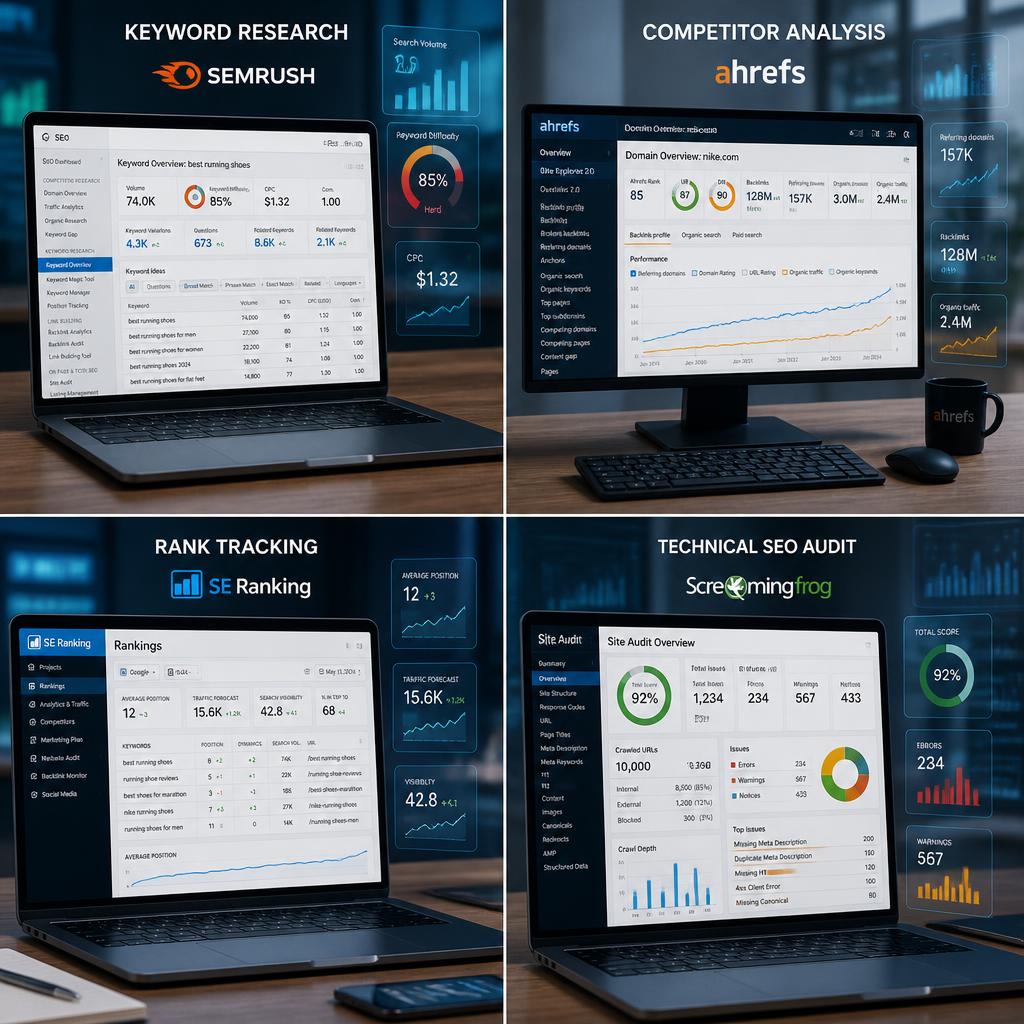
Ahrefs’ current Lite plan is explicitly positioned for small businesses and personal projects and includes Site Explorer, Keywords Explorer, Site Audit, Rank Tracker, and other SEO capabilities.
Choose Moz Pro If You Want an Accessible SEO Workflow
Moz can be a reasonable option for teams that value a relatively straightforward interface and established SEO features.
Choose Ubersuggest If You Are New to SEO
If you’re learning SEO and mainly need keyword ideas, competitor research, and basic website auditing, a simpler platform can reduce the learning curve.
Choose Google Search Console If Your Budget Is Limited
Before paying for an SEO subscription, set up Google Search Console.
It provides valuable search-performance and indexing information at no cost.
How to Choose SEO Software for Your Business
Follow this process before buying a subscription.
Step 1: Define Your Main SEO Goal
Choose your primary objective:
- Increase organic traffic
- Generate leads
- Increase online sales
- Improve local visibility
- Track rankings
- Research competitors
- Improve technical SEO
- Build content
Step 2: Identify Your Required Features
For example:
Local service business
- Local rank tracking
- Keyword research
- Google Business Profile tools
- Review management
- Competitor research
Ecommerce business
- Product keyword research
- Technical audits
- Competitor research
- Rank tracking
- Backlink analysis
Content website
- Keyword research
- SERP analysis
- Content research
- Rank tracking
- Backlink analysis
Step 3: Check Limits Carefully
Do not look only at the monthly price.
Check:
- Number of projects
- Tracked keywords
- Crawl credits
- Historical data
- User seats
- Reports
- Export limits
- Location tracking
- Additional tool costs
For example, Ahrefs currently includes 750 tracked keywords and 100,000 crawl credits in its Lite plan, while Semrush’s current SEO plan includes 500 daily tracked keywords and five monitored websites.
Step 4: Test Your Actual Workflow
Before committing, test each platform using the same tasks:
- Research 20 target keywords.
- Analyze three competitors.
- Run a site audit.
- Examine backlink data.
- Set up rank tracking.
- Export or create a basic report.
The platform that makes these tasks easiest may be a better fit than the one with the longest feature list.
Best Practices for Using SEO Software
Focus on Search Intent
Do not choose keywords solely because they have high search volume.
Determine whether the searcher wants to:
- Learn
- Compare
- Buy
- Find a service
- Solve a problem
- Navigate to a particular website
Prioritize Relevant Keywords
A keyword with 300 highly relevant monthly searches may be more valuable to a small business than a keyword with thousands of searches but little connection to its products or services.
Track More Than Rankings
Measure:
- Organic clicks
- Impressions
- Conversions
- Leads
- Sales
- Revenue
- Ranking trends
Rankings are useful indicators, but they are not the final business outcome.
Combine SEO Tools
Many small businesses do not need multiple expensive subscriptions.
A practical setup could be:
Google Search Console + one paid SEO platform + Google Analytics
That combination can provide substantial SEO insight without creating unnecessary complexity.
Common SEO Software Mistakes
1. Buying Too Many Tools
More subscriptions do not automatically produce better SEO.
Several tools may provide overlapping information while increasing costs.
2. Chasing Only High-Volume Keywords
High search volume does not guarantee qualified traffic.
Look at intent, relevance, competition, and business value.
3. Treating Third-Party Metrics as Google Scores
Metrics such as keyword difficulty, authority scores, and estimated traffic are proprietary calculations.
Use them as research indicators rather than assuming they are official Google measurements.
4. Ignoring Conversion Data
The ultimate goal is usually not simply ranking higher.
SEO should contribute to outcomes such as:
- Leads
- Purchases
- Calls
- Bookings
- Sign-ups
- Revenue
5. Following Automated Recommendations Blindly
An SEO platform may flag dozens of issues. That does not mean every issue deserves immediate attention.
Prioritize changes based on:
Impact × relevance × effort.
Expert Tips for Small Business SEO
Start With Existing Search Data
Open Google Search Console before creating hundreds of new keywords.
Find pages that already receive impressions but relatively few clicks. These pages may present opportunities for improving titles, content, search-intent alignment, or internal links.
Build Topic Clusters
Create groups of related content around your products and services.
For example, a web design company could create supporting content around:
- Website design cost
- Responsive web design
- Ecommerce website design
- Website speed optimization
- Website redesign
- Website maintenance
Then connect those articles through strategic internal links.
Study Competitors Regularly
Use competitor research to identify:
- New pages
- Important keywords
- Content gaps
- Backlink opportunities
- Changes in search visibility
Prioritize Local SEO When Necessary
Businesses serving specific locations should pay close attention to local search.
Semrush’s current Local toolkit, for example, includes Google Business Profile management and Map Rank Tracking.
Update Existing Content
SEO is not only about publishing new pages.
Review existing content when:
- Information becomes outdated
- Rankings decline
- Competitors publish stronger content
- Search intent changes
- New information becomes available
Google’s Search Central resources provide ongoing guidance on improving search performance and maintaining sites that meet Google’s technical and spam requirements.
Internal Linking Opportunities
If this article is part of an SEO tools content cluster, consider linking it to related articles such as:
- Best Free SEO Audit Tools
- Best Backlink Checker Tools in 2026
- Best On-Page SEO Tools in 2026
- Best SERP Analysis Tools in 2026
- Semrush vs Ahrefs
- Best Keyword Research Tools
- Best Local SEO Tools
- Best Technical SEO Tools
These supporting pages can strengthen topical relevance and help readers move naturally between related topics.
Frequently Asked Questions
What is the best SEO software for small businesses in 2026?
The right software depends on your business goals and budget. Semrush and Ahrefs provide broad professional SEO capabilities, while Moz Pro and Ubersuggest can be suitable for simpler workflows. Google Search Console is an important free resource for virtually every website.
Is SEO software worth it for a small business?
It can be worthwhile when the business actively uses the data to improve its website and marketing strategy. SEO software can save research time and help identify keyword, competitor, technical, and content opportunities.
What is the best free SEO tool for small businesses?
Google Search Console is one of the most useful free resources because it provides direct information about a site’s performance in Google Search. Google also provides Search Central documentation to help site owners understand SEO and search performance.
Is Semrush good for small businesses?
Yes. Semrush explicitly offers SEO plans for freelancers and small businesses. Its current SEO offering includes keyword research, competitor analysis, Position Tracking, Site Audit, and AI-search visibility features.
Is Ahrefs good for small businesses?
Yes. Ahrefs currently describes its Lite plan as providing essential data for small businesses and personal projects. The plan includes five projects, 750 tracked keywords, Site Audit, Rank Tracker, and other SEO capabilities.
Is Semrush better than Ahrefs for small businesses?
There is no universal answer. Both platforms cover keyword research, competitor analysis, rank tracking, and site auditing, but their datasets, interfaces, limits, pricing, and workflows differ. Businesses should compare the specific features they use most.
How much should a small business spend on SEO software?
There is no fixed amount. Start with the features you actually need and compare the subscription cost with the value of the work the software enables. Businesses with simple websites may be able to accomplish a great deal using free tools before moving to a paid platform.
Can SEO software guarantee Google rankings?
No. SEO software cannot guarantee rankings. Search performance depends on many factors, including relevance, content, technical accessibility, competition, and Google’s search systems. Google’s own documentation does not present SEO software as a guarantee of first-page or first-position rankings.
Do small businesses need expensive SEO software?
Not always. A small website with a limited SEO program can start with Google Search Console and other free resources. Paid software becomes more valuable when you need larger datasets, competitor research, advanced auditing, automated tracking, or detailed reporting.

Pingback: 15 Best Cheap Web Hosting in 2026: Affordable, Fast & Reliable Hosting Services